MrCrayfish’s Furniture Mod

Minecraft mods adds in what Minecraft has been missing for years, furniture! It includes over 30 pieces of furniture to decorate your bedroom, kitchen, living room and even your garden!

MrCrayfish’s Furniture Mod


List of Furniture:
Bedside Cabinet
Wooden Table
Wooden Chair
Cabinet
Wooden Coffee Table
Fridge
Freezer
Couches (White, Green, Brown, Red and Black)
Blinds
Curtains
Carpet (White, Green, Brown, Red and Black)
Lamp
Stone Chair
Stone Table
Stone Coffee Table
Oven
Oven Range Hood
Hedge (Oak, Pine, Birch and Jungle)
Bird Bath
Stone Path
Picket Fence
Water Tap
Mail Box
TV
Computer
Printer (Includes Ink Cartridge)
Fire Alarm
Stereo
Electric Fence
Ceiling Light
Christmas Tree
Presents

How to install:
Download and install Minecraft Forge.
Download the mod.
Go to %appdata%.
Go to .minecraft/mods folder.
Drag and drop the downloaded jar (zip) file into it.
If one does not exist you can create one.

MrCrayfish’s Furniture Mod Recipes:
http://mrcrayfishs-furniture-mod.wikia.com/wiki/Crafting_Recipes

Author: mr_crayfish

MrCrayfishs-Furniture-Mod-1.5.2.zip

MrCrayfishs-Furniture-Mod-1.6.2.zip

MrCrayfishs-Furniture-Mod-1.6.4.zip

MrCrayfishs-Furniture-Mod-1.7.2.jar

CocoaCraft Mod

Milk! Cocoa! Coffee!
Have you ever thought about why Cocoa beans are used only for crafting cookies and coloring wool? Have you ever wanted to grow more food? Have you missed cocoa in Minecraft? Then this mod is just for you!

CocoaCraft Mod

This simple mod adds cocoa trees, which you can find in forests or jungles. You can harvest them to obtain cocoa beans and cocoa tree saplings. Then you can grow your own trees! But why? This mod also adds possibility to craft mugs and drink milk and cocoa!

You can also find coffee plants. You can obtain coffee seeds from them. These seeds can then be smelted to obtain roasted seeds. Then just pour water into mugs, add coffee seeds and enjoy your fresh coffee! You can even plant the seeds(they must be next to the water on tilled field. Once planted, you can walk across them as you want, you won’t trample them). Coffee plants can be found in forests, jungles and on plains.

Milk – restores 1,5 hunger
Cocoa – restores 2 hunger
Water – nothing
Coffee – swiftness for 60 secs, restores 0,5 hunger

Block and item ID’s and rarity of cocoa trees and coffee plants are now changeable via config file located in .minecraft/config/mod_cocoa. Warning: If you change ID’s of blocks (or items) you already have in your world, the blocks in your world will be replaced/deleted. There is no way to prevent this, so change ID’s with caution!


How to install CocoaCraft Mod:
Download and install Minecraft Forge
Download CocoaCraft Mod
Put CocoaCraft Mod zip file into your /.minecraft/mods folder. Do not unzip it.
If the folder mods is not there, launch Minecraft after installation of Forge once and it should create the folder.

Changelogs:
v1.63
Cocoa saplings now don’t grow instantly when you use bonemeal on them, instead they react as other saplings(green particles and have certain chance of growing)

CocoaCraft-Mod-1.6.2.zip

CocoaCraft-Mod-1.5.2.zip

CocoaCraft-Mod-1.6.4.zip

CocoaCraft-Mod-1.7.2.jar

Lanterns and Flashlights Mod

Lanterns and Flashlights
Features:
Dynamic Lighting!
No FPS drop at all!
3D Items.
Like and Amnsia mod.

 Lanterns and Flashlights Mod

Informations:
Fat:
A basic component to start this mod!
Wax:
Just for crafting purposes!
Bottled fat:
Use to create Lantern Oil!
Bio oil:
Another method to create Lantern Oil!
Lantern oil:
Fuel for the Lantern and for the Furance!
Fill up the barrel.
In the config you can set how many minutes one bottle add to the lantern.
By default: 8 minutes/bottle.
Light bulb:
Again, just for crafting!

Modern HD Resource Pack

Today we are going to introduce you one the most popular packs for Minecraft – modern hd Minecraft resource packs,
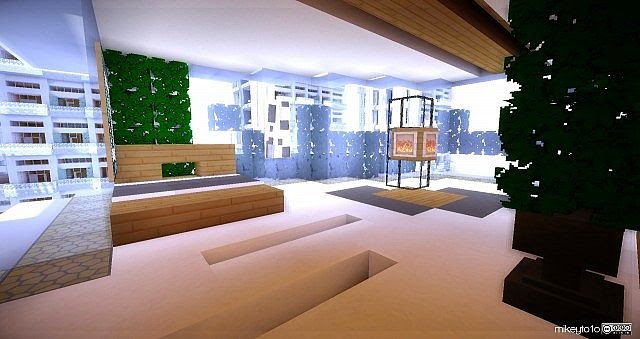
Everything, I mean everything all give you the feeling of current modern house, ranging from kitchen, dining room to bedroom. You must be very surprised to see your own house in this pack. Have a look at these review pictures and you will find it real and modern.

Modern HD Resource Pack

Of course, every texture and sound are new (and state-of-the-art). Try it yourself and leave a comment if you like it.

Modern HD Resource Pack

Modern HD Resource Pack

Modern HD Resource Pack

Modern HD Resource Pack

How to Install Minecraft Resource Pack
Make sure your  Minecraft is updated to 1.6 or higher
Download the resource pack and put it somewhere easily accessible (Desktop)
Open up your .minecraft from Run > %appdata% > .minecraft
Open the resource pack folder which is inside the .minecraft
Then just drag and drop your resource pack to this resource pack folder

Modern-HD-1.7.zip

Modern-HD-Lite-1.6.zip

Millenaire Mod

Millénaire is a single-player Minecraft mods for Minecraft. It aims to fill the “emptyness” of single-player worlds by adding NPC villages to it, with loose 11th-century Norman, North Indian and Mayans themes and additional cultures planned.

Millenaire Mod


Villages are populated with men, women and children of various kinds, who perform tasks such as trading with the player, expending current buildings or improving existing ones, cultivating crops such as wheat in Norman villages and rice in Indian ones, crafting tools and powerful amulets, etc. As the village expends, the number of villagers increases as couples have children who grow up into new adults.

Help villages grow by trading with them and be rewarded with unique items such as Normand and Indian food or statues and tapestries to decorate your house with. And if they start liking you enough, they might even build you a house of your own.

Millénaire is available in the following languages: French, English, German, Russian, Polish, Spanish, Czech, Swedish, Dutch, Portuguese, Slovenian, Chinese and Arabic (more coming!)

Millénaire Library: Library page

Type of villagers
There are currently seven types of villagers:
Farmers, who grow crops in the fields around their house, and bring the resulting wheat back to their house chest.
Lumbermen, who chop trees, plant new trees with saplings they get from destroying leaves, and gather cider apples from leaves as well. They put the wood and apples they gather in their house chests.
Wives, who have the most complex work: taking resources from their husbands’ work to the various public buildings, making bread from wheat, making cider from cider apples, trading with the player and building new constructions.
Children, born at night, and which grow up to become adults when bread is available and new houses are built.
Guards that patrol the village
Priests that visit the church (and the tavern…)
Smiths, which makes Norman tools in the forge
Expansion of the village

The main “aim” of the villagers is to improve their village. There are six initial villagers, but their number will grow as they have children and build new houses. They can also build new types of buildings and improve existing ones. For this they need building materials: wood, cobblestone, glass and stone. The first they can get themselves, the rest only through trade with the player. A complete village currently includes a bakery, a tavern, a church, fountains, a presbytery, a guard tower and an (ugly) castle, plus custom buildings if advanced.

Trade with the player
There are three locations at which the player can trade with the villagers: their Town Hall, the bakery and the tavern (when built):

Town Hall (present at start): you can sell wood, stone, cobblestone, iron and glass (plus extra blocks at time). Payment made in deniers, a special item. You can also buy wood there, and the “village wand”.
Bakery (when built, requires only wood, so normally they can do it without help): buy bread.
Tavern (when built, requires glass, so only after you’ve sold enough to the villagers): buy cider and in upgrade taverns calva. Cider and calva can be used multiple times and give back health.
To trade, go to one of the locations in question and stand near the chests. If no woman is around one will arrive shortly. Right-click on her to bring up the trade screen.

Hold the left shift key while clicking on a trade good in the trade screen to trade 8 by 8 or the left control key to trade 64 by 64.

Finding a village
Since 0.1.4, the easiest way to find a village is to press the V key. If a village is nearby, it will display its name, the distance to it and the general direction. Most new worlds should have villages near the spawn point. If you can’t find one at all, check in the world with the seed b. If there are none there, there is an issue with the mod install.

Creating a new village: the Village Wand
With enough deniers, you can buy a “village wand” from the Town Hall of a village. When used on a obsidian block, it will attempt to generate a new village around the block. Warning: using a village wand is dangerous, as the village can end up being built on top of you, killing you if the ground level goes up. Don’t use it you can’t afford a respawn…

Want to know more first? Check the overview

Millénaire Installer 1.3 download

This installer is not required, but is very much recommended as it makes installing Millénaire faster and simpler, with less risk of errors. It is available for Mac, Windows and Linux and is compatible with other mods and installers.

Mac OS X version

Windows version

Linux version

Also note that neither ModLoader nor Millénaire itself are included in the download. You need to download them seperately.

1.5_Millenaire4.4.0b.zip

1.4.7_Millenaire4.2.0.zip

1.4.6_Millenaire3.4.0.zip

1.4.5_Millenaire3.3.zip

1.5.1/1.5.2_Millenaire5.1.3.zip

1.6.2_Millenaire5.1.9.zip

1.6.4_Millenaire5.1.11.zip

1.7.2_Millenaire5.2b1.zip

Cube World Mod

Minecraft Mods Cube World is a terrain generator, which adds a new world type made up of floating glass boxes with different terrain inside of them.

Cube World Mod

How to install Cube World Mod:
1. Go to %appdata%/.minecraft/versions
2. You should see a folder named 1.7.2. Make a copy of it, and rename the copy to Cube_World_1.7.2 (You can name it whatever you want, but you will need that name later).
3. Inside the new folder, you should see a file called 1.7.2.jar. Rename it to Cube_World_1.7.2.jar (Or whatever you named the folder).
4. Inside the new folder, you should also see a file called 1.7.2.json. Rename it to Cube_World_1.7.2.json (Or whatever you named the folder).
5. Open the Cube_World_1.7.2.json file using Notepad or Wordpad.
6. Inside that file, there will be a line saying “Id”: “1.7.2″. Change that to say “Id”: “Cube_World_1.7.2″. Then save and close the file.
7. Open Cube_World_1.7.2.jar using a program like 7-Zip or WinZip. Copy all of the Files in the zip folder you downloaded into Cube_World_1.7.2.jar, and then delete the META-INF folder from within Cube_World_1.7.2.jar.
8. Open the Minecraft launcher (You will need to restart it if you had already opened it), and create a new profile. In the box that says “Use version”, select “Cube_World_1.7.2″ (Or whatever you named the folder). If you don’t see it under versions, You may have missed one of steps 1-7.
9. Start Minecraft using that new profile, and create a new world. Set that world’s world type to “Cube World”, and create it. It may take a little while longer than usual to load.

Changelogs: v3.0b
Tweaked some spawning probabilities.
Added cubes which contain swamps
Added more lava into the nether cubes, including some partially filled with lava.

Cube-World-Mod-1.5.2.zip

Cube-World-Mod-1.6.2.zip

Cube-World-Mod-1.6.4.zip

Cube-World-Mod-1.7.2.zip

OmegaCraft Realistic HD Resource Pack

Minecraft Resource Pack OmegaCraft HD x128 Made by maniacheto. Hello, TotallyInProWaf here with this texture pack review.So this Minecraft texture pack is actually made by me.The most textures are like real world.

OmegaCraft Realistic HD Resource Pack

OmegaCraft Realistic v12 HD x128.rar

Chirco-Craft Texture Pack

 Chirco-Craft Minecraft Texture Packs 1.5.2. Now with aether Minecraft Mod, Millenaire Support, Custom Animations and Custom Colors!!!And MORE TO COME!!!

Chirco-Craft Texture Pack

How to install
1.Download a texture pack in a ZIP file format, do not unzip. If you created your own textures, you need to ZIP them. For in-depth instructions on obtaining the files to make your own custom texture pack go to Tutorials/Custom Texture Packs.
2.Run Minecraft. If you already have Minecraft running, make sure you save and quit the world: you need to be in the main menu to continue (If you have Optifine, you can go to Options > Video Settings while in-game).
3.Click Texture Packs button.
4.Click Open Texture Pack Folder button; this will open the folder where Minecraft stores all texture packs. If nothing happens, you need to find the folder manually. Depending on your operating system it is:
Windows: %AppData%.minecrafttexturepacks
Linux: ~/.minecraft/texturepacks (This folder may be hidden in the Home Folder)
Mac OS X: ~/Library/Application Support/minecraft/texturepacks (This folder may be hidden)
5.Do not close Minecraft. Place the texture pack (ZIP file) in the opened folder, do not unzip.
6.In a few seconds the texture pack will appear in Minecraft. Select it (may take a few seconds for high-resolution packs), and click Done. The texture pack is now applied, you may now load your world and see the difference.

GLSL Shaders Mod

There are very few Minecraft mods that stand out from the other, however even the mods that do can be topped by even more extraordinary ones. Very few Minecraft mod will continually be loathed forever by the entire user/player community of minecraft, and when this happens; the mod itself will continue to grow player, and feature wise. The GLSL Shaders mod for Minecraft it not only possibly one of the most unique, and extraordinary mods of all time; but it is also perhaps a very long awaited, fully developed, and well created mod in which implements spectacular shading and environmental animations to your game of Minecraft. The mod itself, developed by a very unique creator; has been developed to implement an original and beautiful looking shader into the game. The shader itself introduces a different type of lighting the game, initially enhancing the default brightness, before darkening the Shadows to create a wonderful effect.

The GLSL shaders Minecraft mods is very GPU intensive, and requires a very decent computer to run it well. It is advised that the user be smart when choosing to install, and use this mod. A large amount of FPS (Frame-Rate per second) will be used in the entire process of using the mod. Thankfully, the developer of the mod has released different versions, some with different FPS usage. Even so, the mod will still undoubtedly cause a large amount of lag, this will become a large problem for those of whom do not have a computer in which can run such a mod. If you are unsure of your FPS with or without the mod installed, simply log into your world in Minecraft, and press the F3 button on your keyboard. This will bring up a screen, covered with details and lines of different information The FPS counter is located on the top left of this screen layout, easily labelled and easy to understand. To close this layout, simply press the F3 button once more.
This is modified version of daxnitro’s GLSL Shaders mod, updated for newer Minecraft version since 1.4.2.
There are some added features.
Support connected texture
Support multiple composite programs (compostire1, composite2, composite3)

How to install:
Installation for Minecraft 1.7.5
Run Minecraft 1.7.5 at least once. Close Minecraft and Launcher.
- Copy ShadersModCore-2.4.0mc1.7.5.jar to the following path and filename.
%APPDATA%.minecraftlibrariesshadersmodcoreShadersModCore2.4.0mc1.7.5ShadersModCore-2.4.0mc1.7.5.jar
- Make sure you also have required libraries
%APPDATA%.minecraftlibrariesorgow2asmasm-all4.1asm-all-4.1.jar
%APPDATA%.minecraftlibrariesnetminecraftlaunchwrapper1.9launchwrapper-1.9.jar
- Make a copy of folder
%APPDATA%.minecraftversions1.7.5
- Rename the copied folder to
%APPDATA%.minecraftversions1.7.5-ShadersMod2.4.0
- Open folder 1.7.5-ShadersMod2.4.0
- Rename 1.7.5.jar to 1.7.5-ShadersMod2.4.0.jar (same name as folder)
- Rename 1.7.5.json to 1.7.5-ShadersMod2.4.0.json (same name as folder)
- Open the json file with Notepad++ (or other text editor program)
- Edit value of id. (equals to folder name)
"id": "1.7.5-ShadersMod2.4.0",
 - Edit value of minecraftArguments.
"minecraftArguments": "--username ${auth_player_name} --version ${version_name} --gameDir ${game_directory} --assetsDir ${assets_root} --assetIndex ${assets_index_name} --uuid ${auth_uuid} --accessToken ${auth_access_token} --userProperties ${user_properties} --userType ${user_type} --tweakClass shadersmodcore.loading.SMCTweaker",
 - Add libraries.
"libraries": [
{
"name": "shadersmodcore:ShadersModCore:2.4.0mc1.7.5"
},
{
"name": "net.minecraft:launchwrapper:1.9",
"serverreq": true
},
{
"name": "org.ow2.asm:asm-all:4.1",
"serverreq": true
},
{
"name": "java3d:vecmath:1.3.1"
},
- Edit value of mainClass.
"mainClass": "net.minecraft.launchwrapper.Launch",
 - Save 1.7.5-ShadersMod2.4.0.json
- Reopen Minecraft Launcher
- Create a new profile, edit profile, select version 1.7.5-ShadersMod2.4.0. Save.
- Select the profile and click Play.
- Test.
Manual installation in minecraft.jar
  • 1. Make a backup of original minecraft.jar. (You may want it later.)
  • 2. Open minecraft.jar in WinRAR or 7-Zip or similar program.
  • 3. Delete META-INF in minecraft.jar.
  • 4. If you use Forge, copy files from Forge universal zip into minecraft.jar
  • 5. Copy files from OptiFine zip into minecraft.jar.
  • 6. Copy files from ShadersMod zip into minecraft.jar
  • 7. Copy *.fsh *.vsh files into minecraft.jar/shaders (or leave it empty and copy *.fsh *.vsh into .minecraft/shaders folder instead)
  • 8. Finished. Run minecraft.
Installation for use with Magic Launcher
  • 1. Open Magic Launcher.
  • 2. Click Setup button.
  • 3. Select or create configuration you want to use.
  • 4. If you use Forge, add Forge universal zip.
  • 5. Add OptiFine zip (below Forge universal if used together).
  • 6. Add ShadersMod zip below OptiFine.
  • 7. Add shaders zip file (which has *.fsh *.vsh in shaders folder inside zip)
  • 8. OK
How to use newer version of Shaders Mod with SEUS
  • A. Manual install in minecraft.jar
    • Open minecraft.jar in 7-Zip
    • Delete META-INF
    • Copy files from mod zip into minecraft.jar in this order: (forge), optifine, SEUS-v10rc7, newer ShadersMod
  • B. Merge newer ShadersMod into SEUS-v10rc7 zip (for use with Magic Launcher)
    • Replace .class files in SEUS-v10rc7 zip with .class files from newer ShadersMod.
  • C. Simply use Magic Launcher
    • Add SEUS-v10rc7 zip file below OptiFine and above newer ShadersMod.
    • Add newer ShadersMod below SEUS-v10rc7.

Special Armor Mod

TeeLuk, the original author, has no more time to update his mods.
So he gaves me the source and permission to care about his Minecraft mods in future.
All Mods are working at SSP, SMP and LAN!
You need the recommended Minecraft Forge: version:http://www.minecraft.../topic,5.0.html


How to install:
Put the zip-files into the mods-folder (gets generated by modloader/forge).

Credit: pitman-87

1.7.2_Special Armor Minecraft Mods 

All Version Special Armor 

Brewcraft Mod

Brewcraft is a brewing overhaul for Minecraft. It does not replace vanilla mechanics, but rather adds in a new brewing system that accompanies the vanilla brewing stand. It produces liquid potions which can, in turn, be bottled for quick use.


Installation & Reporting Issues
A prerequisite to this mod is Minecraft Forge. This is required for the mod to run correctly. Aside from this, you'll need our core class library, RedGear Core. Brewcraft must be inside the mods folder in your .minecraft directory.

Author: Enosphorous - LordBlackHole

1.6.4 Brewcraft-1.0.1a.jar

Minecraft Mods

Chromatose Texture Pack

A colorful experience in Minecraft. This pack is totally hand drawn using Wacom tech and Photoshop Elements!


I have used reference to develop some of the materials, however my imagination and my hands are the source of every piece in this pack. I have done several sketches and notes as to what I've wanted to pull off. Mostly trying to get a better grip on color theory.

Note that this pack also uses a bunch of the features that come with MCPatcher, including Custom Colors, Better Glass, CTM, Animated textures, and RandoMobs.

Additional Notes
NOTICE::: 1.7 stable is only stable without MCPatcher, due to issues with mojang's playing with renderPass, Better Glass is having severe issues that will disrupt a great deal of the work done. I have fixed *some* of the issues in 1.7 experimental.

Otherwise everything works right in 1.6 so if you folks are still on 1.6 you'll not have a problem. Hopefully when Minecraft Coders Pack comes out with 1.7.4 we can see how Better Glass will be implemented

You will need MCPatcher for most of the features; I highly recommend CTM, Better Grass, Random Mobs, and Custom Colors. I would highly suggest having fun with Optifine. It's a great fine tuning agent however I haven't used it myself too much recently to ensure CTM will work with it.

Libk Forum: http://www.minecraftforum.net/topic/366545-64x-srds-chromatose-15bwc161718-2-19-experimental-18-ctm-fix-2-all-18-blocks-done-some-more-ctm-fixes-still-some-kinks/

Author: thecrazydudesrd

Version: Minecraft 1.7.4

Resolution: 64x64

1.7.4 SRD_s_Chromatose__x64__1.7_.zip

1.6.4 SRD_s_Chromatose__x64__1.6_.zip

1.5.2 SRD_s_Chromatose__x64__1.5BWC_.zip

Minecraft Texture Packs

Minecraft: Christmas and New Year 2014

Minecraft: Christmas and New Year 2014
Christmas and New Year 2014

Minecraft Skins. How do you feel if your charaters have very new and fashionable skins in many games of Minecraft at this Christmas and up-coming Tet holiday? It will be really fun. Now let me make it come true. I am so excited to be with you in every Minecraft game! :-D
Minecraft Mods. Just like Skins, you seem to get so bored with some Minecraft mods you have ever used. Would you like to take part in extremely modern and great new games as well as experience the exciting atmostphere that you have never tried before? I guess all of you cannot wait more for these wonderful things. Let’s get started to join these games and I will show you how easy it is to find out the other Minecraft mods.
Minecraft Maps. Hmmm… In Minecraft, I like this part most. Do you know why? Well, as you can see, Maps Minecraft is so great because you cannot discover any challenge in every game without Maps Minecraft. The wonderful. Minecraft Maps usually interest me so much but my PC configuration is not suitable. LOL…! However , I do not give up even no matter hard it is. Now I have much more Maps Minecraft than ever after a long time discovering. All of you are welcomed to visit my blog and take a look at these Maps Minecraft. LOL… All is for everyone who are keen on Maps Minecraft. I really hope our Minecraft community will gradually become greater and happier in near future.
Minecraft Texture Packs. I rarely search about it , but I also have many Minecraft Texture Packs to share with you. :D
Christmas and New Year are together coming! minecraftfreemods.net Wish you all happiness and best luck! I hope these great holidays will bring us millions of reasons to smile in life! Merry Xmas and Happy New Year!
Everything will finally be alright! Wish you a successful life! Your all
dreams will definitely come true! <3

                                                                                                          minecraftfreemods.net

Minecraft Mods Christmascraft


Christmas Tree Stand
A sturdy base on which to grow your very own conifer! Just set it down and sprinkle some bonemeal on the top!
Posted Image
Wreath
Nothing says "I'm celebrating Christmas!" like a lush green circle of dead plants!
Posted Image
Christmas Stocking
Hang up your stocking and hope that Santa visits while you sleep! No peeking!
Posted Image
Christmas Light
Decorate your house, your mineshaft, your trees! Hook it up to redstone and watch your electricity bills skyrocket!
Posted Image
Christmas Ornament
Miniature glass balls in 5 fabulous colors! Hang them from your Christmas tree, or any leafy material!
Posted Image
Decorative Star
No Christmas tree is complete without an elegant gold-plated star atop it!
Posted Image
Christmas Gift
Surprise a friend or enemy with a hand-picked item in a decorative paper wrapping! No refunds, exchanges, or re-gifting, please!
Posted Image
Note: Fill the center slot with virtually any item to wrap it up! Unwrap it by placing the gift on a crafting table!
Ice Skates
Walking across ice is for chumps! Strap on a pair of these babies and you'll fly past the competition!
Posted Image
Candy Cane
Candy canes are a quick and easy treat, but loaded with sugar!
Posted Image
Chocolate Milk
Cool refreshing milk, and the richness of chocolate, yum yum!
Posted Image
Hot Cocoa
Heat up your chocolate milk to restore even more hunger!
Posted Image
Note: All of the recipes below require Christmas Spices, which look like this: Posted Image
Christmas Spices can be obtained by killing a Creeper Claus.
Gingerbread Cookie
All of the nutritional value of a regular cookie, with extra Christmas spirit!
Posted Image
Eggnog
A refreshing Christmas tradition, with a hint of nutmeg! Just don't drink too much, or you'll regret it!
Posted Image
Fruitcake
It's a fruitcake.
Posted Image
Deck the halls, bundle up in your warm clothes, and prepare for a Minecraft holiday celebration! ChristmasCraft features a number of changes to help you get into the
Christmas spirit:
Colder biomes, meaning snow is all around!
New items and recipes for delicious Christmas-time treats!
A Christmas Tree Stand on which to grow your very own Christmas tree!
Decorations, such as Christmas ornaments, wreaths, stockings, and redstone-powered Christmas lights!
Three festive holiday music discs!
The ability to wrap up nearly any item as a Christmas present, and give it as an item or place it like a block!
A new semi-rare friendly mob, the Creeper Claus!
Santa's helpers, the Ender Elves, are here to deliver presents!
Perhaps even a visit from Santa himself??
New in version 3.0:
Deluxe twinkling Christmas lights! Crafted just like other lights, but with glowstone instead of a dye!
Fancy ice skates that give you a speed boost on ice (but slow on land)!
Also, the snowy weather and seasonal mobs are only available during the month of December (unless you change the setting in ChristmasCraft.cfg)! After that, biomes will return to normal and the snow will gradually melt.
Installation
Current version: 3.0.0!
For client and server version 1.6.4:
Download ChristmasCraft 3.0.0 for Minecraft 1.6.4 here: Adf.ly MediaFire
1) Minecraft Forge version 9.11 is required for this mod! Install and run it once first!
2) Unzip the ChristmasCraft download, and you will find a ChristmasCraft_3.0.0.jar file
3) Copy ChristmasCraft_3.0.0.jar into your Minecraft "mods" directory
4) Spread some Christmas cheer!
*Note: If you want to run ChristmasCraft on a server, players will still need to install ChristmasCraft to connect to your server!

Link Forum

Author: Newt_head
Minecraft Mods:
ChristmasCraft 3.0.0 for Minecraft client and server version 1.6.4
Requires Minecraft Forge version 9.11
ChristmasCraft 2.1.0 for Minecraft client and server version 1.4.6
Requires Minecraft Forge version 6.5
ChristmasCraft 2.0.6 for Minecraft client and server version 1.4.5
Requires Minecraft Forge version 6.4

Mods Dynamic Liquid Tanks 1.6.4


Dynamic Liquid Tanks is a mod that is based upon storing liquids in Minecraft in a limitless combination using multi-block structures, so that they look just the way that you want them to! These tanks can be customized in almost any way that pleases you. Do you want your tank to be a triangle? It can be! Do you want your tank to be odd or even length? It can be! Do you want your tank to camouflage and appear to be a diamond block? It can be! Do you want some simple hiding lava lighting? This is for you! These multi-block tanks give you a bonus size for each additional tank that is attached to the core and have absolutely no size limit! Wah?!?!

Features:
  • Create multi-tanks to store your various liquids
  • One controller per layer now! (Don't worry its a DLT 1 thing Posted Image)
  • Store multiple liquids inside one tank! (with upgrades of course!)
  • Limitless shape and size possibilities
  • Ability to camouflage/color your tanks.
  • Interact with the tank via BC Pipes, Golems, TE3 and Extra Utils!
  • Resize your tanks for maximum storage potential
  • In world placeable potions!
  • Liquid Nitroglycerin (Liquid TNT)
  • Infinite Potions! (Sort of)
  • Mystic Forest!


Installation
Step one is to download and install Minecraft Forge. Step two DynamicLiquidTanks.jar goes in the mods folder inside .minecraft. Then proceed to modify the block ids in the config file.
[1.6.4]DYNAMIC LIQUID TANKS 2 - STORE FLUDIDS IN DYNAMIC TANKS! FLUID POTIONS, LIQUID TNT, MULTIPLE LIQUIDS IN 1 TANK
Link Forum
Credits: WingsOfLife
Minecraft mods 1.6.4Dynamic Liquid Tanks

Mods Hiding the Light 1.6.4

First, craft a wand.
Then, Use it on any surface (Shift-Right-Click on chests and things.) It will create a light source in midair without a nasty torch in the way.


Change your mind?Just place another block in it's place to extinguish the light.


Do you hate torches? Are you tired of trying to hide glowstone blocks? I've got the Mod for you!
This mod adds very little to the game.A wand that places Light without the need for torches.That's it. I made it as simple as possible.You can edit Item/Block IDs in the config file.Hopefully this opens up your world to a torch-free existence.I eagerly await your input as this is the first mod I have released.THANK YOU!travi1997, for helping me figure out BlockID ranges.darkevilmac, for getting me on the right track with my light source.

Change log
ver 1.4 Added option to adjust light level in config at the suggestion of Sigma85 on Minecraftforums.
ver 1.3 Updated to 1.6.4, changed sound to be more magical, and added different repair recipes for hardcore and normal modes (config option)
ver 1.2 Changed the glow air to green so it doesn't butcher most minimaps. (suggestion by "Dis iz Chris")added the ability to repair the wand in an anvil with glowstone blocks. (Original plan)
ver 1.1Added Hardcore option in config.Added new Icon in config (Defaults to true (new Icon) change to false if you like the old Icon better.Added higher durability in config

Credits: Count_Chuckula

Install:Requires MinecraftForge.Just drop the zip in your mods folder
Minecraft mods 1.6.4:  Hiding the Light

Mods Extra Dimensional 1.6.4


This mod was created because I've never really wanted to go to the Nether or End on my own accord before. I wanted to spice them up a little bit, so I made a mod that adds more mobs, ores, blocks, tools and armor to the dimensions.
Version 1.0.7
Added the mini-boss into the Nether, updated to 1.6.4, added a new way to get the Nether Star (has to do with the mini-boss), and changed the GUI of the Materializer and the Soul Furnace, including their names being displayed properly.


Installing Forge:
1. Look for the latest recommended forge build for 1.6.2 here.2. Click the download link to the right that says Installer.3. Save the installer and run it.4. Install client should already be selected, so click install.5. When it finishes, go to your windows search bar and type in %appdata%6. You should then see a folder called .minecraft. Click on it.7. go to the versions folder in .minecraft that should have a folder in it that says Forge and a bunch of numbers.8. Create a new folder in the versions folder and name it whatever you want.9. Go inside of the Forge folder and copy the jar file and the json file.10. Go inside of the folder you created and paste the jar and the json inside.11. Rename the jar and the json to exactly what you named your new folder.12. Open the json file with a program like notepad or a .txt reader, and you should see a couple sets of quotation marks.13. In the second set, (the ones that should say Forge-blahblahblah inside of them) write the exact name of the folder that you created inside of them and erase the Forge part.14. Go to the launcher. Under the profiles section there should be a button that says "New Profile". Click it.15. Put whatever profile name you want to in the "Profile Name" part.16. In the "Use Version" bar, click the down arrow and you should see an option that says "release" whatever you named your new folder in .minecraft's version folder.17. Select that version, click done, and run your Minecraft while using the profile you just created. When it loads, you know you now have Forge. Yay.

Installing My Mods With Forge:
This is for people that already have Forge installed that want to install other mods.1. Click the download link for my mod on this forum, and it should send you to a dropbox site.2. Click "Download" under the dropbox file.3. Go to your .minecraft file at %appdata%.4. If you don't have a mods folder inside of your .minecraft, make one and open it.5. Drag, NOT extract, but drag and drop my file unopened into your mods folder.6. Go to the Minecraft launcher and play under your installed Forge profile.7. The mod should work! Have fun and be sure to give it feedback on the forums!

Link Forum
Credits: MahTamato
Minecraft mods:
Extra Dimensional_Version 1.0.7_1.6.4
Extra Dimensional_Version 1.0.6_1.6.2

Mods Unique Ores 1.6.4

Unique Ores This is an ores mod created with the purpose to add ores, "Unique" ores if you will, that I have rarely seen in any other updated mods. It also adds a couple of machines and decoration blocks to expand your Minecraft experience.


Installing Forge:

1. Look for the latest recommended forge build for 1.6.2 here.2. Click the download link to the right that says Installer.3. Save the installer and run it.4. Install client should already be selected, so click install.5. When it finishes, go to your windows search bar and type in %appdata%6. You should then see a folder called .minecraft. Click on it.7. go to the versions folder in .minecraft that should have a folder in it that says Forge and a bunch of numbers.8. Create a new folder in the versions folder and name it whatever you want.9. Go inside of the Forge folder and copy the jar file and the json file.10. Go inside of the folder you created and paste the jar and the json inside.11. Rename the jar and the json to exactly what you named your new folder.12. Open the json file with a program like notepad or a .txt reader, and you should see a couple sets of quotation marks.13. In the second set, (the ones that should say Forge-blahblahblah inside of them) write the exact name of the folder that you created inside of them and erase the Forge part.14. Go to the launcher. Under the profiles section there should be a button that says &amp;amp;quot;New Profile&amp;amp;quot;. Click it.15. Put whatever profile name you want to in the &amp;amp;quot;Profile Name&amp;amp;quot; part.16. In the &amp;amp;quot;Use Version&amp;amp;quot; bar, click the down arrow and you should see an option that says &amp;amp;quot;release&amp;amp;quot; whatever you named your new folder in .minecraft&amp;amp;#39;s version folder.17. Select that version, click done, and run your Minecraft while using the profile you just created. When it loads, you know you now have Forge. Yay.

Installing My Mods With Forge:

This is for people that already have Forge installed that want to install other mods.1. Click the download link for my mod on this forum, and it should send you to a dropbox site.2. Click &amp;amp;quot;Download&amp;amp;quot; under the dropbox file.3. Go to your .minecraft file at %appdata%.4. If you don&amp;amp;#39;t have a mods folder inside of your .minecraft, make one and open it.5. Drag, NOT extract, but drag and drop my file unopened into your mods folder.6. Go to the Minecraft launcher and play under your installed Forge profile.7. The mod should work! Have fun and be sure to give it feedback on the forums!

Link Forum

Credits: MahTamato
Minecraft mods:
Unique Ores_Version 1.0.55_1.6.4
Unique Ores_Version 1.04_1.6.2

Texture Packs Luc's


Starting with V 0.4.7, changes before this version are NOT mentioned here!
V 0.4.9:Added textures:
birch log
birch leaves
iron block
torches
wooden door
lily pad
bricks
reworked all wooden planks (especially birch planks and spruce planks)

Luc's Texture Pack/ Resource Pack

Credits: LuckyLuc
Minecraft download1.6.4_Luc_s_Pack_V_0.4.9.1.zip


Free Minecraft Mods Copyright © 2011-2012 | Powered by Blogger